Showing posts with label programming. Show all posts

Monday, April 14, 2008

Cross-site Scripting (XSS)

Two days back, my shoutbox was hacked :). I was not aware that people are actually visiting this, which I made long back to have similar thing for Ethos in june, 2005. After that i haven't updated the code and many things were left in between.

What actually happened: Cross Site Scripting, when we want user to input some data (which may be html/javascript) and displays it back. So if html/script tags are not properly checked it can cause trouble. Earlier I hadn't checked for javascript, iframe inputs. So somebody just inserted an iframe as message input in my shout box. And the source of iframe contained redirection to another website. So when shouts were displayed on the page the iframe code was displayed as it is and page got redirected to other page.

Luckily I checked the page just after the day this happened, So that way i actually got chance to update this orphaned code and made some fixes.

Solution : Idea is to filter meta characters such as (< , >, ' , " etc) Which will prevent browser from processing them as part of some script, they will be processed as plain text only.
So while doing in php you can do:

$shout=str_replace("<","&lt;",$_GET["shout"]);

And to be on safer side we should also replace following characters:

replace ( with &#40;
replace ) with &#41;
replace & with &amp;
replace ' with &#39;
replace " with &#34;

Or If you are not expecting user to input these characters then you can simply replace these with null string;

So now you can enjoy Shout Box until some new bug is found or its hacked again [;)]

Related post:
SQL Attacks: Hacking (SQL injection)

Saturday, April 12, 2008

My Del.icio.us Toolbar 2.0

Yesterday I was working late night till 3AM, to update my extension 'My Del.icio.us Toolbar' which I made long back in October 2006. Reason was to make it work for newer versions of firefox. But then I added some new features too :

  • I added a Explore feature which is similar to Stumble.
  • Checking Del.icio.us cookies to verify authentication. (You can find more details on how to read browser cookies from javascript here. Actually It uses nsICookieManager interface to iterate over all of the cookies.
Try My Del.icio.us 2.0 (Right now you may have to login to access the extension as it's in Sandbox.)

I also noticed that mozilla has redesigned the extension page. They have also added a nice statistics Dashboard for extension, provided graphical representation of number of downloads, active daily users etc. I was surprised to see that older version of My Del.icio.us has reached a total download of 11,200 (not that a big number but still surprising for me) and number of active user around 1000.

Try My Del.icio.us 2.0 and provide feedback.

Also Try: Del.icio.us SearchER
Related Post:

Wednesday, February 20, 2008

Adobe AIR: Web to Desktop

Past few days, I have came across Adobe AIR through digg, techmeme, delicious and so today i thought i should try this. Adobe AIR lets us their existing web development skills in HTML, AJAX, Flash and Flex to build and deploy rich Internet applications to the desktop. For Application development you will need two things:


Having Adobe AIR extension for Dreamweaver CS3 can be very helpful as it facilitates to package and preview .air application files directly within Adobe Dreamweaver CS3.

As my first AIR application, I ported my rubiks cube timer as a desktop application (RubikTimer.air). Its very easy using dreamweaver extension, have a look here : Create your first HTML-based AIR application with the AIR SDK (great tutorial for beginners).

One problem I faced: Usually setInterval("display()",500) works with Firefox/IE but it was not starting with no error message to look into but then i found out about using Adobe CommandLine tool. (via Three ways to debug Adobe javascript Application). It´s called ADL and resides in the /bin folder of the SDK. ADL showed the Error: "Unsafe javascript". Then after some random changes when i change it to "setInterval(display,500)", It started working. Another problem I faced was related to keypress events in javascript, were not working with AIR (still have to resolve this issue)

Download RubikTimer.air here
Web Based Rubik Cube Timer

Related Post:

Sample Adobe AIR Applications
Trying hands on Google gadgets

Trying hands on google gadgets

Tonight i tried creating some google gadgets (actually its quite easy using Google Gadget Creator). You can check out them here: Google gadgets . You can use html / javascript (as in any other webapage) to create gadgets.Rubik timer gadget So i converted my Rubiks Cube Timer to a gadget. Other one is a gadget to search stock, scripts on bombay stock exchange.

You can also create gadgets using : Make your Own Gadget (Which is as simple as filling out forms)

Monday, April 09, 2007

.Net apps on linux

Actually i had to do some assignment in C#, so first i thought of going to windows and do it with VisualStudio (IDE)..but voila... i found its alternative for linux : mono
It allows you develop and run .net framework applications.
I was able to install it easily in ubuntu:

sudo apt-get install mono
sudo apt-get install mono-gmcs

Now you can compile .cs files {extension for c#} using

gmcs file.cs

and run using

mono file.exe

More details about Csharp compiler :gmcs
See these links for more details and examples:
http://www.mono-project.com/Main_Page
Mono brings .NET apps to Linux
Introduction to Mono - Your first Mono app

Sunday, February 25, 2007

OpenID ??

today i read this article which explains what openid is ??

Lately OpenID has been hitting the front page of digg, del.icio.us, and many other large websites.
Read More>>
OpenID - What is it, and why everyone is talking about it
you can also go through..
Authenticated Distributed Search (OpenSearch, OpenID)
Add OpenSearch to your site in five minutes

Additional link(offtopic and old article but i came across this well written article and couldn't resist posting it.. ):
What Every Webmaster and Web Developer MUST Know About Ruby on Rails and AJAX It’s not a tutorial, it’s not a “how-to” but he explains very well just what the heck all this.

Saturday, February 24, 2007

Web Development Tools

Great listing of web developers powertools by Brennan Stehling.
I'll starts with extension for firefox that comes very handy while web devlopment.

  • Web Developer : Adds a menu and a toolbar with various web developer tools.
  • Firebug: Allows you to edit debug, and monitor CSS, HTML, and JavaScript live in any web page.
  • ColorZilla: Advanced Eyedropper, ColorPicker, Page Zoomer and other colorful goodies.
  • Live HTTP Headers
The list Web Development Tools for the Power Developer contains :

Validators

Javascript

Websites

Read More>> (also containing ASP.NET, Proxy tools)
And w3schools, a great place for finding tutorials realted to web development.

Updated(29 April 2007) : Tools for web-designers.

Related Post :

Thursday, February 22, 2007

Improving interactivity with Javascript

HTML controls other than conventional Push buttons, radio buttons, check boxes, select boxes, and text inputs, can power up forms, webdev using javascript to increase interactivity and easy (for users). List of such controls includes : slider, Date picker, Smart text boxes, Advanced tooltips, Auto validation etc.

Read more friendly bit >> Improving interactivity with Javascript
In addition, I find image maps also very handy when it comes to intereactivity when used properly with tooltips...as i used them in Paint Chat.

Bonus link[ :) ] DailyBlogTips > Web 2.0 Webdesign Tutorials
Related post :

Monday, February 12, 2007

Firebug : web development evolved

I found firebug very useful while developing my Paint Chat (which is not a big code as such but still), so here it goes in admiration of firebug:

Firebug integrates with Firefox to put a wealth of development tools at your fingertips while you browse. You can edit, debug, and monitor CSS, HTML, and JavaScript live in any web page.
Firebug is firefox addon that helps you in webdevelopment with
its powerful feature such as javascript debugger, Inspect and edit HTML, Tweak CSS to perfection, Monitor network activity, Explore the DOM and many more. Feature I like most is its quickly diagnosing problem, it allows you set break points and checking intermediate values of variable for javascript thus making a great javascript debugger. Many times you are stuck at where did the code went wrong so in way its a lot useful in saving time.


I also like is its inspecting html and modifying html and css on fly and see the results with helpful tooltips. It also help in positioning of divs, images with its nice feature of visuallizing css metrics with ruler and box model coloring(HTML inspecting).

It other great feature is its interface which is comes with browser window split in two halves one for your website and one is extension interface (though it also can be detached from it). I am also a fan of Web developer toolbar extension but what it lacks is a java debugger and this great interface but both are a must of a web developer.

Related Post :

Firebug - Web Development Evolved

Sunday, February 11, 2007

Play with html using javascript

Javascipt can be very fruitful and flexible when it comes to modifying webapges dynamically (though client side). Javascript can be helpful in creating response to browser events like mouseup, mouseover etc, veryfying of form values prior to submitting them, changing style and value of html elements dynamically.
Examples i disscuss here are being user by me in developing Paint Chat !! So here I go..
You can write javascript functions and code in section as:

<script type="text/javascript">function test(){
alert("test javascript");}</script>

Action on events:

Example of events can be mouseclick, keystroke, submitting form etc.
With onload()
 <body onload="init()">
Now init() function will be called when this html page is being loaded.
For links, javascript function can be evoked when clicking, mouseover over links like
 <a href="javascript:replay()">Refresh ! </a>
Now function replay() will be called when Refresh! is clicked. For input text box
<input type="text" size="30" id="search" onchange="suggest()">; 
Now whenever content of textbox changes the function suggest() will be called. It can be useful when feature like google suggest has to be implemented or so.

On submitting forms:
<form method="post" action="some.php" onsubmit="return checkForm()">
So whenever this form is being submitted checkForm() function will be called and can be helpful in verifying values of form elements.

onMouseOver and onMouseOut:
<a href="http://www.buard.blogspot.com" onmouseover="fade()">
<img src="image.gif"> </a>
Now when mouse is over image fade() function will be called and can be used for animate and styling purposes.

Registering of events

A simple way can be:
Conside the html code : <div id="sample"> ..... some... html..text.. </div>
Now using javascript you can register event for this div by:
 var div_sample = document.getElementById('sample');
div_sample.onmousedown=sampleMouseDown ;
Now whenever mouseover ocours over this div html element sampleMouseDown() function will be called. Events can also be registered using addEventListener() . Find more information baout it here:Advanced event registration models

Modify Style and values for html elements

Within some javascript function, you can first get the element object by getElementByID() getElementsByName() for example conside the javascript code:
document.getElementById("colorcode").innerHTML = "#000000";
document.getElementById("bgtest").style.backgroundColor= "green";
The first line find the html element with id colorcode and then set its value to "#000000" using innerHTML. In second line, it sets the background of html element with id "bgtest" to green.

Some other tweaks which were useful :
  • Calling some function repeatedly with some time interval, consider javascript code:
var intervalID = setInterval(drawCurve, 100);
So the drawCurve() function will be called repeatedly after 100ms. You can cancel this process( removing repeatedly calling) by clearInterval(intervalID);

  • You can use setTimeout(drawCurve,100) function to delay drawCurve() execution for a specified time period(100ms).
  • Calling a php function inside javascript:
var testImg = new Image();
testImg.src = "form.php?name=form_value";
Now here in form.php you can fetch value of variable name using $_GET and can perform appropriate action.

Some links:Related Posts:

Friday, February 09, 2007

Paint Chat !!


Now chat using a paint brush !!.

I had made this app which uses paint brush to express yourself and share with others. This uses HTML:Canvas for drawing graphics using javascript, so no sluggish java applet and flash. It uses XMLHttprequest to synchronize paint screen with server. You can share this url with your friends to have a chat with paint brush and use Refresh !! to update your paint screen with that of your friend.
Read about Paint chat.
Try It out : Paint Chat

Updated: I have added feature for filling up whole background with color and also the transparency feature.

Related Post:
Shout-Box

Sunday, October 08, 2006

funky javascript

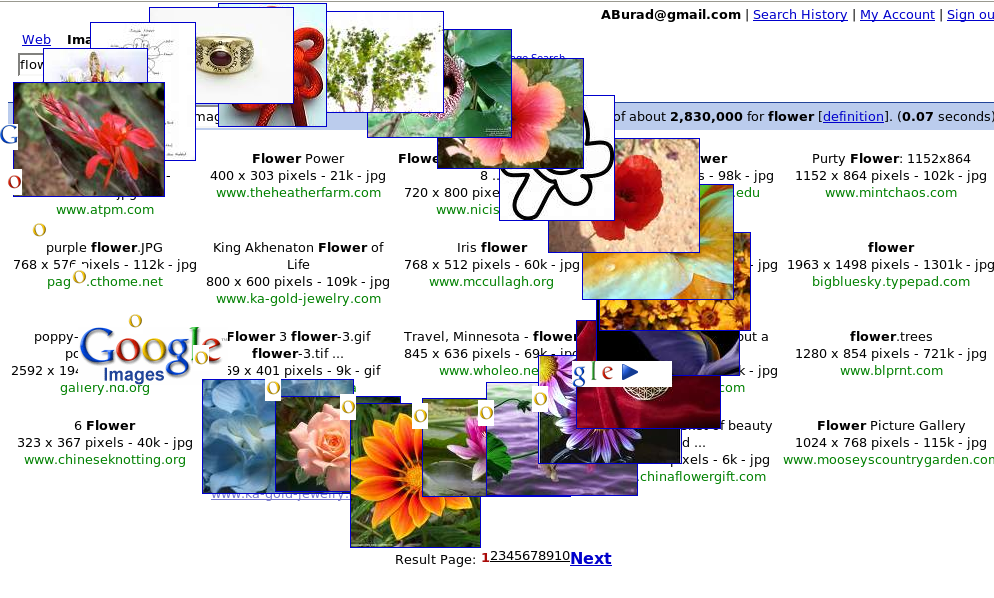
Just paste the JavaScript given in you address bar after visiting any website.
Copy this to location bar & press enter.
--------------------------------------------------------------------------------------------
javascript:R=0; x1=.1; y1=.05; x2=.25; y2=.24; x3=1.6; y3=.24; x4=300; y4=200; x5=300; y5=200; DI=document.getElementsByTagName("img"); DIL=DI.length; function A(){for(i=0; i-DIL; i++){DIS=DI[ i ].style; DIS.position='absolute'; DIS.left=(Math.sin(R*x1+i*x2+x3)*x4+x5)+"px"; DIS.top=(Math.cos(R*y1+i*y2+y3)*y4+y5)+"px"}R++}setInterval('A()',5); void(0);
---------------------------------------------------------------------------------------------
This is what you get when you try it on search result from google images:


Related Links : http://burad.blogspot.com/2006/03/little-tweaks-with-javascript_23.html

Source : Digg.com

Wednesday, July 19, 2006

An Introduction to AJAX

AJAX (Asynchronous JavaScript and XML) is the latest boom in the Web development world. AJAX helps developers narrow the gap between desktop and web applications — Google Earth, Flicker and MS Outlook Express Web Version are some of the applications powered by AJAX.

Asynchronous means that you can make a request to a server and perform other actions while the server is processing your request -- and on the arrival of the response required actions can be performed -- as opposed to conventional web applications, in which the user has to sit back and stare at the blank screen while the server is processing the request.

AJAX Architecture :
Figure 2

Read More >>
Source : Topcoder

Thursday, June 08, 2006

Secure Programming for Linux and Unix HOWTO

This book provides a set of design and implementation guidelines for writing secure programs for Linux and Unix systems. Such programs include application programs used as viewers of remote data, web applications (including CGI scripts), network servers, and setuid/setgid programs.

read more | digg story

Wednesday, March 29, 2006

Why Ruby on Rails Will Ultimately Dominate Software Development

The new 1.1 version of Ruby on Rails almost seems to drive the final nail into the coffin of .NET and J2EE. Enterprises will take their time but everyone else will start turning out great software. Includes rare video interview with Rails creator and detailed overview of Rails 1.1.

read more | digg story

Thursday, March 23, 2006

Little tweaks with javascript : Bookmarklets.

A bookmarklet is a snippet of Javascript that can be bookmarked (or saved as a favorite) inside your web browser. Bookmarklets can enhance web pages, add special functionality using javascript which is supported by most browsers today and make your browsing experience a lot more efficient by offering one-click access. I will first start with basics.
Consider a simple javascript :

  • javascript:alert('You clicked on the page');
When you type this in browsers location bar then it will show a message box with "you clicked on the page" message. Now change this slightly :
  • javascript:function ab(){alert("hello") ;};void(setInterval(ab,1));
Now this will repeatedly pop-up the message box in every 1-sec interval. Though this is of no use i'm just telling this to explain basics of javascript.

Now filling form with javascript :
  • javascript:function ab() {document.forms[0].login_username.value="someText" ; } ab() ;
Now this javascript will fill the value "someText" in field login_username of form in html page.
And lets try to take some user-input :

  • javascript:function ab() {q=document.getSelection(); if(!q) {void(q=prompt('Text :',''))} else alert(q)} ab();
Now this javascript will first check if some text is selected on page. If no text is selected it will prompt user for text else will show an message box with selected text. Now we can put this script to some good use : like

  • javascript:function ab(){q=document.getSelection(); if(!q){void(q=prompt('Search Text at My Blog: ',''))} location.href="http://www.technorati.com/search/ "+q+" linux?from=http://burad.blogspot.com "; }; ab();
Now this will search the selected text on my blog or if text is not selected than prompt user for text.

An equivalent script for searching on wikipedia is :
  • javascript:(function(){q=document.getSelection(); if(!q){void(q=prompt('Wikipedia keywords:',''))}; if(q) location.href= 'http://en.wikipedia.org/w/wiki.phtml?search='+escape(q)})()
Now you can bookmark this script in toolbar so every tim you click on button in toolbar it will execute javascript. For example Drag this to your firefox bookmark toolbar :


Search Burad's Blog
Or for wikipedia
Search Wikipedia

Some more bookmarklets :
Scale Images

Sort Table

Transpose Table

Show Password

So in a way they are different from bookmarks and provides extra functionality through power of javascript. Here are some more javascript bookmarklet
You can view source for each bookmarklet by viewing page source .
You can find more bookmarklets at : http://www.squarefree.com/bookmarklets/

See this helpful screencast on bookmarklets.

Some More Example at Wisdombay

Updated : For changing documenet backgrounds :
Change to Red
Change to green
Change to blue
This may not work with pages using css

Tuesday, March 14, 2006

Poster of History of Programming Languages

Poster of history of programming languages of 1954-2004.

read more | digg story

Sunday, February 05, 2006

List of Algorithms

This single wikipedia webpage shows you a list of algorithms neatly classified into categories. Pick the ones you are interested in !

read more | digg story

Friday, November 18, 2005

Why Ruby Shouldn't Be Your Next Programming Language

An interesting view of programming languages.

read more | digg story

Tuesday, November 15, 2005

Hindi Songs & Programming Constructs

The Hindi Song Lovers Guide to Programming in FORTRAN 90
ISBN ... 12340-007

--------------------------------------------------------------------------
10 The IF GO TO statement

Koi jab tumhara hriday toRde
TaRapta hua jab koi chhoRde
Tab tum mere paas aana priyay
Mera dar khula hai, khula hi rahega
Tumhare lie, koi jab tumhara................................(Mukesh)

20 The DO loop

Sau saal pehle, mujhe tumse pyaar tha
Mujhe tumse pyaar tha
Aaj bhi hai, aur kal bhi rahega
Sadion se tujhse milne, jiya beqarar tha
Jiya beqarar tha
Aaj bhi hai, aur kal bhi rahega..............................(Rafi/Lata)

The IF THEN ELSE statement
(in 2 songs for the novice)

30 IF THEN

Tum agar saath dene ka waada karo
Main yunhi mast naGHme luta-ta rahun
Tum mujhe dekhkar muskurati raho
Main tumhe dekhkar geet gaata rahun
Tum agar saath dene ka..........................................(Kapoor)

40 ELSE

Tu na mili to hum jogi ban jaenge, tu na mili to
Tu na mili to hum jogi ban jaenge, tu na mili to han
Saari umariya ko rogi ban jaenge, tu na mili to
Tu na mili to hum jogi ban jaenge, tu na mili to................(KK)

The IF THEN ELSE statement
(in 1 song for the advanced user)

50 IF THEN

Tum agar mujhko na chaaho to koi baat nahin

ELSE

Magar kisi aur ko chaahogi to mushkil hogi.........................(Mukesh)

60 The CALL statement

Aaaja, aaja, aaaja, aaaaaaja
Tujhko pukare mera pyaar, hoe
Tujhko pukare mera pyaar
Aaja, main to miTa hun tere pyaar me
Tujhko pukare mera pyaar
Tujhko pukare mera pyaar.........................................(Rafi)

70 The WHILE DO Statement

Jab tak rahe tan me jiya
Waada raha O saathia
Hum tumhare lie, tum humare lie
Ho, hum tumhare lie, tum humare lie
Jab tak rahe tan me jiya..........................................(Asha)


The Mukesh fan corollary: For every IMAGINABLE situation, there
exists at least one REAL Mukesh song which can be sung in your
REAL world.

------------------------------------------------
The return statement

aa laut ke aaja mere meet
tujhe mere geet bulaate hain
mera soona padare sangeet
tujhe mere geet bulaate hain...

aa ab laut chale, nain bichhaye,
bahen basaye,
tujhko pukaare, desh tera...

------------------------------------------------
Procedure call

aaja re ab mera dil pukaara
ro ro ke gham bhi haara
badnaam na ho pyar mera, aaja re...

------------------------------------------------
free() /* delete useless memory */

bhooli hui yaadon mujhe itna na sataao
ab chain se rehne do, mere paas na aao...

------------------------------------------------
realloc() /* reallocate pre-used memory! */

aaya hai mujhe phir yaad wo zaalim
gujra zamaanaa bachpan ka
hai re akeyle chhod ke jaana...

------------------------------------------------
Interrupt sub-routine

o jaane wale ho sake to laut ke aana
ye ghaat, tu ye baat kabhi bhool na jana
o jaane wale ho sake to laut ke aana...

-------------------------------------------------
function prototype declaration, as in:
chalna *chhaliya (character hindu, muslim, sikh, isahi)

chhaliya mera naam, chalna mera kaam
hindu, muslim, sikh, isahi sab ko mera salaam...

-------------------------------------------------
exit(), suspend

Ruk jaa o jaane waali ruk jaa
main to raahi tere manzil kaa
nazron mein teri main buraa sahi
aadmi buraa nahin main dil kaa...

-------------------------------------------------
for(;;), the infinite loop

hum tum, yug yug se ye geet milan ke
gaate rahe hain, gaate rahenge
hum tum...

-------------------------------------------------
[remote login:] tumse kuchh kehna hai,
gar tum kuch kehne do
[Permission granted:] aji bole binaa hum jaane,
rahne do ji rahne do
[Connection established] tumse kuchh kehna hai,
gar tum kuch kehne do...

-------------------------------------------------
getchar() /* get character */

ye to kaho, kaun ho tum, kaun ho tum ?
mujhe poochhe bina dil mein aane lage
meethi nazaron se bijli giraane lage
ye to kaho, kaun ho tum, kaun ho tum...

-------------------------------------------------
volatile variable

main raahi bhatakne waala hoon
koi kya jaane matwaalaa hoon...

extern variable

mera joota hai jaapaani
ye patloon inglistaani
sar pe laal topi rusi
phir bhi dil hai hindustaani...

static/local variable

Jeena yahaan, marna yahaan
iske siwa jaana kahan
jee chaahe jab humko aawaaz do
hum hain wahin, hum the jahaan...

complex variable

jaaon kahaan bataa ae dil
duniya badi hai sangdil
chaandni aayi ghar jalaane
soojhe na koi manzil...